

How to Fix Sound System Feedback
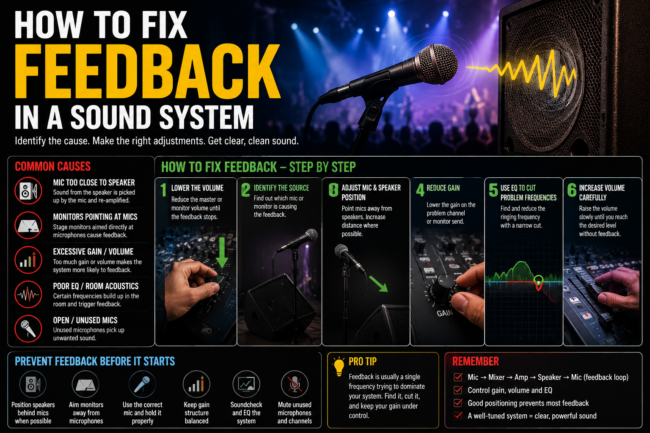
Sound system feedback happens when sound from a loudspeaker is picked up again by a microphone and repeatedly amplified through the system.
The result is the familiar high pitched squeal, howl or ringing sound that can suddenly appear during an event, concert, church service or presentation.
The quickest way to reduce feedback is to increase the distance between the microphone and speakers, point microphones away from loudspeakers, reduce the problematic frequency and manage the system’s gain properly.
However, feedback is rarely caused by just one thing. Speaker placement, microphone technique, room acoustics, monitor levels, equalization and gain structure can all contribute.
What Causes Sound System Feedback?
Understanding how to fix sound system feedback starts with knowing what causes the loop in the first place.
The basic feedback loop looks like this:
Microphone → Mixing Console → Amplifier/Powered Speaker → Sound in the Room → Microphone
If enough of the amplified sound returns to the microphone, the system can begin reinforcing the same frequency repeatedly.
Eventually, that frequency becomes louder and feedback occurs.
Common causes include:
1. Microphone Too Close to a Speaker
This is one of the most common causes.
When a microphone is positioned where it can directly hear the output of a loudspeaker, the system has a much higher chance of feeding back.
This can happen with both main PA speakers and stage monitors.
2. Stage Monitors Pointing Into Microphones
On stage, microphones and monitors often have to share a relatively small amount of space.
If a monitor is positioned directly into the pickup area of a vocal microphone, increasing the monitor volume can eventually trigger feedback.
This is particularly common when performers ask for more volume in their monitors.
3. Excessive Gain
Gain determines how strongly an input signal is amplified at the preamp stage.
If too much gain is applied, the system can become unnecessarily sensitive to ambient sound and microphone pickup.
Gain should be set deliberately rather than simply turning everything up.
4. Excessive Volume
More volume does not necessarily mean better sound.
Every sound system has limits based on the equipment, venue, speaker placement and acoustic environment.
Pushing the system beyond what the room and equipment can comfortably support can increase the risk of feedback.
5. Poor Microphone Technique
A performer holding a microphone incorrectly can significantly change how the microphone behaves.
For example, covering the grille of some microphones can alter their acoustic response and make feedback more likely.
Holding a microphone too far away can also encourage performers to ask for more monitor or PA volume.
6. Room Acoustics
Hard walls, ceilings and floors can reflect sound around a room.
In a highly reverberant space, microphones may pick up more reflected sound, making it harder to achieve high volume before feedback occurs.
This is one reason why the same sound system can behave differently in two different venues.
7. Incorrect Equalisation
Certain frequencies naturally become more problematic than others.
If a frequency is already prominent in the room or system, excessive boost at that frequency can make feedback more likely.
Careful EQ can help control these frequencies.
How to Stop Microphone Feedback
If feedback starts during an event, don’t simply turn every channel down.
Use a controlled troubleshooting process.
Step 1: Reduce the Problematic Volume
When feedback starts, reduce the relevant microphone or monitor level enough to regain control.
If the feedback is coming from a stage monitor, reduce that monitor’s send rather than immediately changing the entire front of house mix.
Step 2: Identify Where the Feedback Is Coming From
Ask:
Is it the main PA?
Is it a stage monitor?
Is it an in-ear monitoring system?
Is it one microphone?
Is it happening across the entire system?
Finding the source makes troubleshooting much faster.
Step 3: Check Microphone and Speaker Positions
Make sure microphones are not pointing directly toward speakers.
For stage monitors, position them according to the microphone’s pickup pattern.
For example, many cardioid vocal microphones have their strongest rejection toward the rear of the microphone.
Understanding the microphone’s polar pattern can therefore help determine where the monitor should be positioned.
Step 4: Reduce Unnecessary Microphone Gain
If a microphone is not being used, mute it.
If several open microphones are on stage, unnecessary microphones increase the amount of ambient sound entering the system.
This is particularly important for:
- Choirs
- Panel discussions
- Conferences
- Worship services
- Large bands
- Multi microphone productions
Step 5: Check the EQ
If the same frequency repeatedly rings, a sound engineer can identify and reduce that frequency.
This process is sometimes called ringing out a monitor or system tuning.
The objective is not to remove large amounts of EQ across the entire system.
The objective is to identify problematic frequencies and make controlled adjustments.
Step 6: Check the Gain Structure
A professional sound system should have an appropriate gain structure from the microphone input through the console and into the speaker system.
If one stage of the signal chain is excessively high, the engineer may have to compensate elsewhere.
Correct gain structure provides cleaner control and can make the system easier to operate.
How to Prevent Feedback Before an Event
The best time to deal with feedback is before the audience arrives.
Position the Speakers Correctly
Main speakers should be positioned so that they provide the required audience coverage without unnecessarily projecting directly into open microphones.
Position Stage Monitors Carefully
Monitor placement should take into account:
- Microphone polar pattern
- Performer position
- Stage layout
- Monitor output
- Microphone type
Perform a Proper Soundcheck
A proper soundcheck allows the production team to identify potential feedback problems before the performance begins.
The engineer can test:
- Vocal microphones
- Instruments
- Monitors
- IEMs
- Main PA
- Wireless systems
- Playback sources
Keep Unused Microphones Muted
Every open microphone can contribute additional ambient sound to the system.
Mute channels that aren’t being used.
Avoid Unnecessary EQ Boost
Boosting frequencies simply because something sounds louder can reduce the available headroom of the system.
EQ should be used to solve a specific problem rather than as a substitute for proper system setup.
Why Does Feedback Happen More Easily in Some Venues?
Venue acoustics can make a major difference.
A large hall with hard surfaces may produce significant reflections.
A poorly positioned speaker can send sound toward reflective surfaces, which then return sound toward microphones.
A church, conference hall, outdoor stage and nightclub can therefore require very different approaches even when similar equipment is being used.
This is why professional sound reinforcement involves more than simply selecting powerful speakers.
The system needs to work with the room, stage, audience and production requirements.
Can Better Speakers Eliminate Feedback?
Not by themselves.
Higher quality equipment can provide better control, coverage and performance, but feedback is fundamentally related to the relationship between:
Microphones + speakers + gain + acoustics + positioning + frequency response
Replacing equipment without addressing the underlying problem may not solve the issue.
In some situations, the problem may actually be caused by speaker placement, room acoustics or gain structure rather than the speakers themselves.
Does a More Powerful Sound System Cause More Feedback?
Not necessarily.
A more powerful system does not automatically mean more feedback.
However, if a system is capable of producing significantly more acoustic output and is operated without proper system design, speaker placement or gain management, feedback can become a problem.
The goal is not simply to have the loudest system.
The goal is to achieve clear, even and controlled coverage at the required level.
What About Wireless Microphones?
Wireless microphones can experience feedback just like wired microphones.
The fact that a microphone is wireless does not itself cause acoustic feedback.
However, wireless systems introduce additional considerations such as:
- Frequency coordination
- RF interference
- Battery management
- Antenna placement
- Receiver positioning
- Gain settings
For larger productions with multiple wireless microphones, proper frequency coordination is particularly important.
Why Does My Church Sound System Keep Feeding Back?
Church environments can be particularly challenging because they may combine:
- Large rooms
- Reflective surfaces
- Choir microphones
- Multiple vocal microphones
- Stage monitors
- Wireless microphones
- High microphone counts
- High audience capacity
The solution is usually not simply to buy louder speakers.
The system may need a combination of:
Better speaker positioning
Appropriate microphone selection
Monitor management
Correct gain structure
System tuning
Acoustic treatment
Operator training
A professional assessment can help identify which of these factors is actually causing the problem.
Why Does My Conference Room Microphone Keep Feeding Back?
Conference rooms often have a different problem.
Multiple microphones may be active at the same time, and speakers may be positioned close to the microphones.
Solutions can include:
- Better microphone placement
- Automatic microphone mixing
- DSP configuration
- Echo cancellation where appropriate
- Speaker repositioning
- Appropriate microphone selection
- Correct gain structure
For permanently installed systems, proper system design is particularly important.
When Should You Call a Professional?
If feedback happens occasionally during a small presentation, basic microphone and speaker positioning may solve the problem.
However, professional assistance is recommended when feedback is persistent or affects a large production.
Consider a professional sound assessment when:
- A venue regularly experiences feedback
- Multiple microphones are required
- A church system is difficult to operate
- An auditorium has uneven sound coverage
- Stage monitors cannot reach the required level
- A concert requires high sound pressure levels
- A permanent AV installation is being planned
- Different engineers repeatedly experience the same problem
A professional sound engineer can assess the complete signal chain instead of treating the symptom alone.
Quick Troubleshooting Checklist
If your sound system starts feeding back, check these first:
- Lower the affected microphone or monitor level.
- Identify which microphone or speaker is causing the problem.
- Move the microphone away from the speaker.
- Check the microphone’s pickup direction.
- Mute unused microphones.
- Check the monitor mix.
- Check problematic frequencies with appropriate EQ.
- Review the gain structure.
- Consider the room’s acoustics.
- Have the system professionally tuned if the problem continues.
Final Answer: What Is the Best Way to Prevent Sound System Feedback?
The most effective way to prevent feedback is to design and operate the sound system as a complete system rather than treating individual pieces of equipment in isolation.
Good microphone placement, appropriate speaker positioning, controlled gain, sensible EQ, proper monitoring and an effective soundcheck can significantly improve feedback resistance.
For larger venues and productions, system design and professional tuning become increasingly important.
The objective is not simply to eliminate one squealing microphone.
It is to create a sound system that provides clear, consistent and controlled coverage without constantly approaching the point of feedback.
With the right setup, sound system feedback is almost always preventable.
Need Help With a Sound System?
Royalty Global Sound provides professional sound reinforcement, AV installation, backline supply and technical consultancy for events, venues, churches, corporate spaces and live productions.
If you’re dealing with persistent feedback or planning a new sound system, RGS can assess the technical requirements and recommend an appropriate solution.
Talk to RGS About Your Sound System
Related Services: Sound Reinforcement | AV Installation | Technical Consultancy
Related Articles: What Is Sound Reinforcement? | What Is a Technical Rider? | Line Array vs Point Source Speakers | What Is Backline Equipment?